Summary
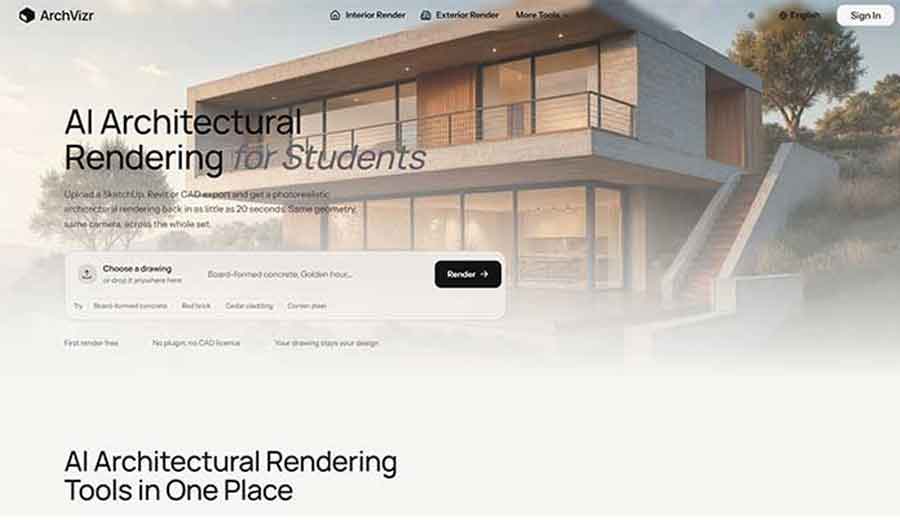
ArchVizr is a browser-based AI rendering tool that converts SketchUp, Revit, Rhino, and CAD exports (plus hand sketches) into photorealistic architectural renders, typically in about 20 seconds for a fast-mode image.
It works by reading the uploaded drawing as fixed geometry and then adding material, lighting, and site context around it, rather than generating a new building from a text prompt.
The free plan gives four render generations with no card required, and paid plans start at $14.99 a month. It’s a strong fit for small practices, students, and freelance visualizers who need a fast first-pass render without a rendering studio retainer, but it’s a genuinely new product with almost no independent review history yet, so anyone relying on it for a paid client deliverable should treat the first few renders as a trial, not a guarantee.
Quick Facts
| Category | Details |
|---|---|
| Price | Free (4 renders); paid plans from $14.99/month (Starter) to $49.99/month (Professional); annual billing available at roughly 50% off monthly rates |
| Signup Required | Yes, to use beyond the first free render; no card required to start |
| Platform | Web-based, no plugin or CAD license needed |
| Standout Feature | Renders a full matched set of images (multiple lighting conditions, materials, angles) from one uploaded drawing, keeping camera and massing locked across the set |
| Best For | Small architecture practices, students, freelance visualizers, developers needing pre-sales imagery |
| Worth Knowing | Very new tool with minimal independent review coverage as of September 2026; commercial use and watermark terms on the free tier aren’t fully clear from the pricing page alone |
What Is ArchVizr?
ArchVizr is an AI rendering platform built specifically around architectural workflows rather than general image generation. The pitch is straightforward: export a view from whatever software is already in use, upload it, describe the materials and time of day, and get back a photorealistic image that keeps the same windows, floor count, and camera angle as the source drawing.
The company frames this as a response to a real gap in the market: traditional architectural visualization has historically been priced and scheduled for studios with a dedicated rendering budget, leaving smaller practices, students, and freelancers without an affordable option when a client meeting or crit is the next morning.
There’s a naming wrinkle worth flagging upfront. Several unrelated companies use similar names in the architectural visualization space, including archVi (a proptech company based in Bengaluru), ArchVision (a 3D content platform), and various studios trading as “Archviz” or “Arch-Vizz.” None of these are connected to archvizr.com.
Anyone searching for reviews or comparisons should double-check the URL, since search results for “archviz” and its variants pull in a lot of unrelated businesses.
Public listings place ArchVizr in aggregator databases as of August 2026, which lines up with it being a recently launched product.
That matters for how much weight to put on this review: there simply isn’t a long track record of user complaints, refund disputes, or edge-case failures to draw on yet, the way there would be for an established tool that’s been through a few years of public scrutiny.
Key Features
- Sketch/CAD-to-render conversion that accepts SketchUp hidden-line exports, Revit elevations, Rhino screenshots, and hand sketches on tracing paper as valid inputs
- Geometry-locked rendering, meaning the model is designed to preserve massing, floor count, roofline, and camera framing rather than reinterpreting the design
- Two speed modes: a fast pass that returns a first image in roughly 20 seconds, and a “Best” mode that takes closer to two minutes for additional detail
- Multiple lighting conditions per drawing, including golden hour, blue hour, night, and overcast, generated from the same uploaded geometry without redrawing anything
- Style transfer from a reference image, letting a user drop in a moodboard photo and apply that material palette (board-formed concrete, brick, cedar, corten steel, glass, stone) to the render
- Landscape and site context rendering, adding planting, paving, and surrounding context so a building doesn’t read as a model floating on white
- Interior rendering that matches exterior palette, useful for lobbies and show units that need to visually agree with the building’s exterior materials
- AI render video and unlimited 2K/4K upscaling, available on paid plans
- No plugin or CAD license required, since everything runs through a web upload rather than a software integration
Who Should Use ArchVizr?
This tool is a reasonable fit for people who need a fast, presentable render and don’t have (or don’t want to spend) a full visualization budget for every job.
That includes one-to-ten-person architecture practices that can’t justify a rendering subscription on every invoice, architecture students producing boards the night before a crit or competition deadline, and freelance visualizers who want a quick base pass for material and light before doing final grading themselves.
Property developers and marketing agencies working with pre-sales materials for a scheme that’s still a volume study, without a finalized facade, are also a sensible match, since ArchVizr is explicitly built to generate multiple material and lighting options off one massing model.
It’s a poor fit for anyone who needs guaranteed photometric or code-accurate lighting for a formal planning submission where the rendering itself carries legal weight, since the tool’s own FAQ section on this point wasn’t fully populated with detail at the time of this review, and no independent case studies confirm how planning departments have received it.
It’s also not the right tool for large studios that already have an in-house rendering pipeline and need tight, granular control over camera lensing, depth of field, or entourage placement, since ArchVizr trades that level of control for speed.
And it’s not going to help anyone who needs 3D geometry output rather than a 2D image, since the product only returns rendered stills and short video clips, not editable 3D files.
Use Cases
- Client meeting prep: A practice exports a SketchUp massing model in the evening and has six lit-and-materialed frames of the same building ready before a morning presentation, useful when the client hasn’t decided on facade material yet.
- Competition and studio submissions: A student converts a hand sketch or Rhino screenshot into a photoreal board image the night before pin-up, without commissioning or waiting on a paid visualizer.
- Pre-sales marketing for unbuilt schemes: A developer or agency turns an early volume study into a real-estate-ready image for a brochure or listing before the elevation is finalized, useful when a sales deadline lands ahead of design sign-off.
- Freelance visualization base passes: A visualizer runs a client’s export through the tool to get material and lighting blocked in quickly, then finishes grading and custom touches in Photoshop rather than starting from a blank render scene.
- Cross-discipline visual consistency: An interior designer whose scope is a lobby or show unit generates a matching exterior frame so the palette agrees across both, without commissioning a separate exterior render.
- Rapid facade or material comparisons: A team runs the same drawing through with brick, render, and cedar options to compare before committing to a sample order or spec decision.
Why ArchVizr Stands Out in 2026
The core differentiator isn’t image quality by itself, since plenty of AI rendering tools can produce a striking single photoreal frame. It’s that ArchVizr is built around generating a consistent set of images from one drawing rather than one isolated image.
The site’s own framing makes this explicit: most AI rendering tools optimize for one hero shot, while a real client deck or planning pack needs several frames that visibly agree with each other in massing, camera position, and site context.
Locking geometry so the tool adds material and light without moving structural elements, and then offering multiple lighting passes (golden hour, blue hour, night, overcast) off that same locked geometry, is a meaningfully different product decision than a general-purpose image generator retouching a render frame by frame.
The pricing structure also reflects a specific bet on who the buyer is. Rather than pricing for firms that already have a visualization retainer, the tiers start at $14.99 a month, positioned for individual practitioners and small studios rather than enterprise accounts, with a one-time credit-pack option available for people who only need renders around a single deadline rather than an ongoing subscription.
Advantages Of Using ArchVizr
- Fast turnaround, with a usable first image in roughly 20 seconds on fast mode
- No CAD plugin or software license required, since everything runs through a browser upload
- Geometry preservation is a stated design priority, reducing the risk of the AI inventing windows or altering massing that hasn’t been approved
- Free tier requires no card to try, lowering the barrier to testing it on an actual project drawing
- Style transfer from a reference photo gives more material control than a generic prompt-based tool
- Coordinated multi-frame output (same building, different lighting or materials) saves the manual work of regenerating and re-matching separate images
- Pricing is transparent and published, with a one-time credit-pack option for people who don’t want an ongoing subscription
Limitations Of ArchVizr
- The tool is extremely new, appearing in aggregator databases only since around August 2026, so there is essentially no long-term track record of reliability, support responsiveness, or how the renders hold up across hundreds of real projects
- Independent reviews are sparse. As of this review, third-party listings show only a small handful of user reviews total, which is nowhere near enough of a sample to draw confident conclusions about typical satisfaction or failure rates
- The testimonials featured on ArchVizr’s own homepage are self-published by the company, not independently verified, and should be read as marketing content rather than independent evidence
- The pricing page’s feature list doesn’t clearly distinguish, at a glance, which specific capabilities (commercial use rights, watermark removal) apply to the free tier versus paid tiers, so anyone planning to use a free-tier render commercially should confirm this directly with support before doing so
- What makes a render count as a “Pro AI Render Generation” versus a standard one isn’t explained on the pricing page, which makes it harder to estimate real usage costs in advance
- No plugin integration with SketchUp, Revit, or Rhino means every render requires a manual export-and-upload step rather than a one-click render from within the modeling software itself
- As a geometry-locked tool, it’s not designed for cases where a user wants the AI to suggest design changes rather than just re-skin an existing drawing
ArchVizr vs. Alternatives
| Feature | ArchVizr | mnml.ai |
|---|---|---|
| Entry price | Free (4 renders); paid from $14.99/month | Free credits on signup; paid plans reported from around $19/month |
| Software compatibility | SketchUp, Revit, Rhino, CAD exports, hand sketches | SketchUp, Revit, Blender, 3ds Max, Lumion, V-Ray, Twinmotion, hand sketches |
| Speed | ~20 seconds (fast mode), ~2 minutes (best mode) | Roughly 10 to 30 seconds per render, per independent review coverage |
| Toolset breadth | Sketch-to-render, style transfer, interior/exterior/landscape rendering, video | Broader toolset with 12+ specialized tools and 40+ style presets, per its own marketing |
| Geometry consistency across views | Central selling point; multi-frame sets from one drawing | Supported via its style and render tools, though not framed as the core differentiator |
ArchiVinci is another commonly cited alternative in this space, but its publicly reported pricing varies significantly between sources (some list it starting in the high $30s a month, others cite a $79 monthly rate), so exact figures aren’t included here.
Anyone comparing it against ArchVizr should check ArchiVinci’s own pricing page directly rather than relying on third-party aggregator numbers, which appear inconsistent as of this writing.
Broadly, mnml.ai has the more established public track record and broader software compatibility, including support for 3ds Max, Lumion, and V-Ray users, along with a wider set of specialized rendering tools.
ArchVizr’s advantage is its narrower, more disciplined focus on generating a matched, camera-consistent set of images off one drawing, which is arguably the more useful feature for anyone producing a client deck or planning pack rather than a single hero image.
Pricing Detail
ArchVizr runs on a four-tier structure with both monthly and annual billing, plus a one-time credit-pack option for people who only need renders around a single deadline:
- Free: 4 AI render generations, sketch-to-render access, personal use, email support
- Starter: $14.99/month ($179.94 billed yearly), 100 standard generations plus 50 “Pro” generations, full access to all rendering tools, full-resolution downloads, commercial use, watermark-free output, unlimited 2K/4K upscaling
- Plus (marked as most popular): $29.99/month ($359.94 billed yearly), 300 standard generations plus 150 Pro generations, same feature set as Starter at higher volume
- Professional: $49.99/month ($599.94 billed yearly), 1,000 standard generations plus 500 Pro generations, same feature set at the highest volume
Annual billing works out to roughly 50% off the monthly rate across all three paid tiers. The distinction between a standard and a “Pro” render generation isn’t defined on the pricing page itself, so anyone budgeting closely around expected monthly usage should ask ArchVizr’s support directly what triggers a Pro-tier deduction before committing to a plan size.
FAQs
Does ArchVizr change my building’s design when it renders it?
According to ArchVizr’s own materials, no. The tool is built to preserve massing, floor count, roofline, window placement, and camera position from the uploaded drawing, adding only material and lighting. This is presented as a specific design choice distinguishing it from more general AI image tools that can alter structural details.
Is ArchVizr free to use?
There’s a free tier that includes four AI render generations with no credit card required to start. Beyond that, paid plans begin at $14.99 a month for the Starter tier.
What file types can be uploaded to ArchVizr?
The tool accepts SketchUp hidden-line exports, Revit elevations, Rhino screenshots, general CAD exports, and hand sketches, according to the product’s own description of its workflow.
Do I need a SketchUp or Revit plugin to use ArchVizr?
No. ArchVizr runs entirely through a browser upload and doesn’t require a plugin or a CAD software license, which also means every render requires a manual export step rather than a one-click render from inside the modeling software.
How long does it take to get a render back?
Fast mode is designed to return a first image in roughly 20 seconds; a “Best” mode that produces more detail takes closer to two minutes, based on ArchVizr’s own stated processing times.
Is ArchVizr good enough for a planning submission?
This isn’t fully clear from public information. ArchVizr markets itself as suitable for planning packs, but there’s no independent case study or third-party confirmation available yet of how planning authorities have actually received renders produced with the tool. Anyone submitting to a planning department should verify local requirements around AI-generated imagery before relying on it for that specific use case.
Last updated: September 18, 2026