Summary
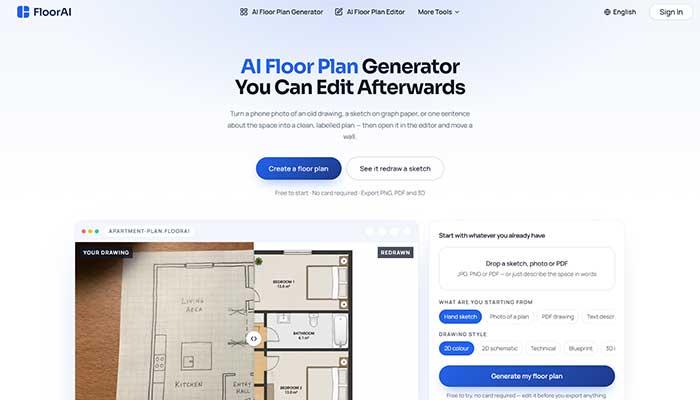
FloorAI is a browser-based tool that turns a text description, sketch, photo or PDF into a labelled floor plan. Its main selling point is a built-in editor. Walls, rooms and furniture can be adjusted after generation instead of regenerating the whole drawing.
The free plan offers 4 generations, and paid plans are displayed at $9.99, $24.99 and $49.99 per month. It suits listing plans, renovation sketches and first-draft layouts. It is a weaker choice for construction-grade drawings, because no independent reviews or accuracy evidence were found.
Quick Facts
| Field | Details |
|---|---|
| Category | AI floor plan generator and editor |
| Price | Free plan with 4 generations. Paid tiers displayed at $9.99, $24.99 and $49.99 per month, with yearly totals of $119.94, $299.94 and $599.94 |
| Signup required | Yes. The generator page asks for login before generating |
| Platform | Web browser. No dedicated app was found |
| Standout feature | Generated plans stay editable in a built-in editor |
| Best for | Estate agents, renovating homeowners, small design studios, property photographers |
| Worth knowing | No independent reviews found. Monthly-billing prices were not confirmed. Refunds are limited once credits are used |
What Is FloorAI?
FloorAI accepts four starting points: a written description, a hand sketch, a photo of an existing plan, or a PDF drawing. It returns a labelled layout with room names and areas. The About page says the product was built around an editor rather than only a generator. The pitch is that most AI tools leave a user stuck when one wall is wrong.
The company behind it is not identified. The About page names no founder, business entity or location. The Terms of Service reference U.S. law and binding arbitration.
The Terms also describe a design platform covering interior, exterior and outdoor-space visualization. That is broader than the floor plan focus of the product pages. It suggests shared legal text across several products.
The name is easy to confuse with other products:
- FloorPlanAI (floorplanai.net): a separate text-to-floor-plan generator with its own pricing.
- FloorDesign.ai: another floor plan and room design site.
- Floor AI (App Store): an unrelated iPhone app that previews flooring materials in a room photo.
- Floori: an unrelated flooring catalog and visualization platform for manufacturers and distributors.
Only FloorPlanAI and FloorDesign.ai compete directly. A G2 profile called “Floorplan AI” has zero reviews, and its link to floorai.ai could not be confirmed.
One recent TechBullion article discusses FloorAI favourably. It largely repeats the site’s own editing claims, so it is not treated here as independent confirmation.
Key Features
- Four input types. Text, sketch, photo and PDF are all accepted. The homepage says JPG, PNG and PDF files work for image conversion.
- Detailed text controls. The generator page offers Simple and Advanced modes, area in square metres or square feet, a floor count, and a free-text field of up to 8,000 characters. Up to 8 reference images can be added, each up to 10MB in JPEG, PNG or WebP.
- Fast and Best modes. Best is described as higher quality. Users can request 1 to 4 images per run.
- Built-in editor. The site says walls and openings can be dragged, rooms renamed, and furniture moved and rotated. Plans can be re-exported in another style without regenerating.
- Multiple drawing styles. The homepage claims seven. Its selector shows five: 2D colour, 2D schematic, technical, blueprint and 3D isometric. The generator page shows three. The exact count is unclear.
- Layout alternatives. The site describes several arrangements of one footprint, side-by-side comparison and upper-floor generation that matches the floor below.
- Presets. Four residential scenarios are listed, plus building types such as office, restaurant and gym.
- Exports. The homepage lists PNG, PDF and GLB. A testimonial mentions DXF, but no feature listing confirms it.
- Video render. The homepage lists a floor plan video render on paid tiers.
Who Should Use FloorAI?
FloorAI fits people who start with an existing drawing and need a clean version fast. A listing agent handed a faded printout is the clearest case. Homeowners comparing renovation layouts before a builder quote also fit. So do small design studios preparing options for a first client meeting.
It is a poor fit for anyone who needs certified or permit-ready drawings. The Terms provide the service “as is” and do not guarantee specific design outcomes. Surveyors, structural engineers and architects producing construction documents should treat output as a visual draft only.
It also suits casual users badly if they expect unlimited free use. The free plan is capped at 4 generations.
Use Cases
- Digitising an old plan. A photo of a creased sales printout becomes a clean, labelled plan for a listing or brochure.
- Renovation options. A homeowner generates a knock-through and a keep-the-wall version, then compares them before requesting quotes.
- Client meetings. A designer brings two or three layout options instead of one.
- Property marketing. A photographer or letting agent adds a plan to a listing package. A 3D isometric style makes it readable for non-specialists.
- Small commercial spaces. A café or gym owner tests a floor layout from a preset before signing a lease.
- First-pass drafting. A freelance draughtsman generates a starting plan, then finishes details by hand.
Why FloorAI Stands Out in 2026
The differentiator is a workflow choice. Many AI generators return a finished image, and any change means writing a new prompt. FloorAI puts every plan into an editor first. The homepage states that editing is included on every plan and is not an upgrade.
The site also claims competing tools cannot edit their output. That comparison was not verified, and FloorPlanAI’s own answer on editing could not be read. The editing feature itself is described consistently across the site. Its quality was not tested.
A second point is input flexibility. Converting an existing sketch or printout is treated as a core use, not a side feature. That matches how most agents and homeowners work. They rarely start from nothing.
Advantages of Using FloorAI
- Editing after generation avoids wasting credits on repeated regeneration.
- Four input types cover text, sketches, photos and PDFs.
- A free tier lets users check the workflow before paying.
- Several drawing styles come from the same layout, so walls stay consistent between versions.
- Paid tiers include large allowances: 100, 400 or 1,000 standard generations, plus Pro generations.
- The Privacy Policy says uploaded images are not used to train models without explicit consent. It also says personal data is deleted within 30 days of account deletion.
- Layout comparison suits renovation and design decisions.
Limitations of FloorAI
- No independent evidence. No G2, Trustpilot or Reddit reviews of this tool were found. Nearly every claim about speed and accuracy comes from the vendor.
- Accuracy is unproven. The site says generation gets most of the way there, then relies on the editor for fixes. No measurement data was published. Room dimensions should be checked by hand.
- Unclear company. No founder, company name or location was found. That matters when files are stored and payments are taken.
- Confusing pricing display. The displayed monthly figures match the yearly total divided by 12. The monthly-billing price was not captured. The pricing page also calls credits “AI Design Generations,” while the homepage says “AI Floor Plan Generations.”
- Inconsistent feature claims. The number of drawing styles varies between pages.
- Unclear free-plan scope. The page text lists commercial use and watermark-free output on every card, so free-plan access could not be confirmed.
- Limited refunds. Refunds are generally unavailable after credits are used. Exceptions require contact within 7 days.
- Testimonials are unverified. The homepage quotes named users, but none could be independently confirmed.
FloorAI vs FloorPlanAI
| FloorAI | FloorPlanAI (floorplanai.net) | |
|---|---|---|
| Input | Text, sketch, photo, PDF | Text, plus up to 16 reference images |
| Free plan | 4 generations | 1 credit on signup |
| Paid pricing | $9.99 to $49.99 per month displayed, billing basis unclear | $19 per month for 300 credits, $59 per month for 1,500 credits |
| Editing | Built-in editor advertised | Not confirmed from captured text |
| 3D | Isometric style, GLB export listed | GLB models at 10 credits each |
| Signup | Login required to generate | Google sign-in required |
FloorPlanAI leans toward 3D models and per-credit pricing. FloorAI leans toward converting existing drawings and editing them. For manual drawing with no AI generation, an established tool such as Floorplanner is a different category, and its review coverage is mixed.
Pricing Detail
The pricing page lists four plans:
| Plan | Displayed price | Yearly total | Allowance |
|---|---|---|---|
| Free | $0 | None | 4 generations |
| Starter | $9.99 per month | $119.94 | 100 generations, 50 Pro |
| Plus | $24.99 per month | $299.94 | 400 generations, 200 Pro |
| Professional | $49.99 per month | $599.94 | 1,000 generations, 500 Pro |
The page also offers Monthly, Yearly (-50%) and One-time options. One-time credit pack prices and the credit cost per design were not visible. The pricing page’s FAQ covers these points, but its answers were collapsed. Check the live page before buying.
FAQs
Is FloorAI free to use?
Yes, within limits. The free plan offers 4 generations. Paid tiers are displayed at $9.99, $24.99 and $49.99 per month. An account is needed to generate.
Can FloorAI plans be edited after generation?
The site says yes. A built-in editor allows moving walls, renaming rooms and repositioning furniture. The homepage says editing is included on every plan. Editing quality was not tested for this review.
Can FloorAI plans be used commercially?
The pricing page lists commercial use and watermark-free output on every plan card, including Free. The tick marks could not be read. A homepage testimonial implies the free plan is for personal use. Confirm the free card on the live page before using output for client work.
Is FloorAI accurate enough for construction?
No evidence supports that use. The Terms disclaim guaranteed outcomes, and no accuracy data was published. It is better suited to listings, concepts and planning discussions. Measurements should be verified on site.
Does FloorAI offer refunds?
Refunds are generally unavailable once generation credits have been used. The Terms list exceptions for technical failures, duplicate charges and billing errors. Contact must be made within 7 days of purchase.
Is FloorAI the same as FloorPlanAI?
No. FloorAI (floorai.ai) and FloorPlanAI (floorplanai.net) are separate products with different pricing. Other similarly named products, such as a flooring app and a flooring catalog platform, are unrelated.
Last updated: September 18, 2026