What is Bigmp4?
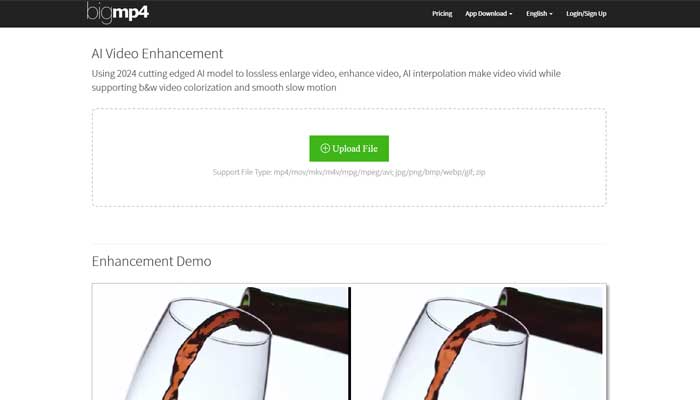
Bigmp4 is a cutting-edge AI-powered video enhancement tool designed to elevate video quality through state-of-the-art technology. Whether you’re a content creator, video editor, or digital marketing professional, Bigmp4 simplifies the process of enlarging, enhancing, and coloring videos.
With its innovative AI models from 2024, Bigmp4 is the perfect solution to transform your video projects.
Key Features of Bigmp4
- AI-Powered Video Enhancement
Utilizes advanced 2024 AI technology to effortlessly upscale videos to 2K, 4K, and 8K resolutions, enhancing video clarity while reducing noise. - Colorization of Black and White Videos
Transforms black and white videos into vibrant, realistic colorized footage with the help of AI. - AI Video Frame Rate Interpolation
Enhances the video’s fluidity by increasing frame rates to 60, 120, or 240 fps, providing smoother, lifelike visuals. - Slow-Motion Effects
Retains frame rates post-interpolation to produce silky smooth slow-motion effects. - Batch Processing Support
Supports uploading multiple images in a zip file for batch processing, including tasks like HD enlargement and colorization. - GIF Enhancement
Improves GIFs with high-definition enlargement, colorization, interpolation, and slow-motion effects.
Advantages of Bigmp4
- High-Resolution Video Enhancement
Boosts video quality significantly, producing high-resolution outputs with enhanced clarity. - Wide File Compatibility
Supports a wide array of video and image formats including mp4, mov, mkv, jpg, png, bmp, webp, and gif. - Efficient Batch Processing
Allows the processing of multiple files simultaneously, saving valuable time, especially for large projects. - Easy-to-Use Interface
The user-friendly interface makes the enhancement process simple and accessible to users with minimal technical knowledge.
Disadvantages of Bigmp4
- Learning Curve
Users may need some time to familiarize themselves with the platform’s advanced features and options. - Processing Time
High-resolution tasks may take considerable time depending on the file size and selected settings. - Subscription Fees
Accessing all premium features and faster processing requires a paid subscription, which might not be suitable for all users.
Who Can Benefit from Bigmp4?
- Content Creators
Enhance video quality for platforms like YouTube, TikTok, and other social media channels. - Video Editors
Elevate the resolution and aesthetics of professional video projects. - Digital Marketing Agencies
Produce high-quality, eye-catching video content for marketing campaigns. - Archivists
Restore old black-and-white footage by colorizing and enhancing video quality. - Other Use Cases
Educational institutions improving learning materials with enhanced videos; freelance photographers optimizing editing workflows.
Pricing Details
- Free Plan: 30 GPU points per month with limited features.
- $6 USD / 300 GPU Points: One year access with task prioritization, 100MB upload limit, AI interpolation, and batch mode.
- $18 USD / 1080 GPU Points: One-year plan with priority tasks, a 100MB upload limit, AI interpolation, and batch processing.
- $24 USD / 1560 GPU Points: One-year plan offering full features with task prioritization, a 100MB upload limit, AI interpolation, and batch processing.
Note: Pricing details may vary, so it’s best to check Bigmp4’s website for the latest updates.
What Sets Bigmp4 Apart?
Bigmp4 stands out by offering the ability to enlarge videos to ultra-high resolutions without compromising quality. Its AI interpolation feature enhances frame rates to a smooth 240 fps, ensuring videos appear natural and fluid. Additionally, its batch-processing feature and wide file format support make it a versatile tool for professionals across different industries.
Compatibility and Integration
- File Format Support
Works seamlessly with mp4, mov, mkv, m4v, mpg, mpeg, avi, jpg, png, bmp, webp, gif, and zip files. - Batch Mode
Supports processing multiple videos and images at once, improving efficiency.
Bigmp4 Tutorials
Check out Bigmp4’s tutorial series on YouTube for step-by-step guides on using the platform, from basic setup to advanced features.
Conclusion
Bigmp4 stands out as a powerful and reliable tool for enhancing video quality, especially for professionals in content creation, video editing, and digital marketing. With features like AI-powered video enlargement, colorization, and frame rate interpolation, it provides users with an unmatched edge in video editing.
Whether you’re restoring old footage or enhancing high-definition videos, Bigmp4 is an invaluable tool for achieving superior video results.